Weight-Loss App Onboarding: A Quiz Funnel Teardown
The onboarding of the best-known weight-loss subscription app is not an in-app tutorial. It is a web quiz funnel that runs from a Meta ad through a long quiz and a personalised plan reveal to a paywall, before the user installs anything. To learn from it, you need the whole path captured screen by screen, not just the ad. That is what we mapped in our case study of this weight-loss quiz funnel, and this article walks through what it shows and what to test in your own funnel.
Key Takeaways
-
Onboarding here starts with an ad and a quiz of roughly 10 to 30 minutes, so the quiz is the product’s first impression.
-
Personalisation is the pitch: answers feed a projected goal date, a behaviour profile and a plan before any price appears.
-
The paywall arrives after the commitment built by the quiz, and follow-up emails and coaching continue the same story.
-
In our capture, 101 Meta ads, 94% of them pointing to the weight-loss quiz, and 38 screens give a fair picture of scale. All spend figures are estimates from captured ads.
-
Dated captures of every step let you spot changes and borrow test ideas without clicking through quizzes by hand.
Where onboarding really begins: the ad and the landing page
The app’s own homepage says new users start with a quick quiz that customises the experience around goals, lifestyle and preferences, and that in most cases they can begin with a free trial. In practice the first touchpoint is a Meta ad.
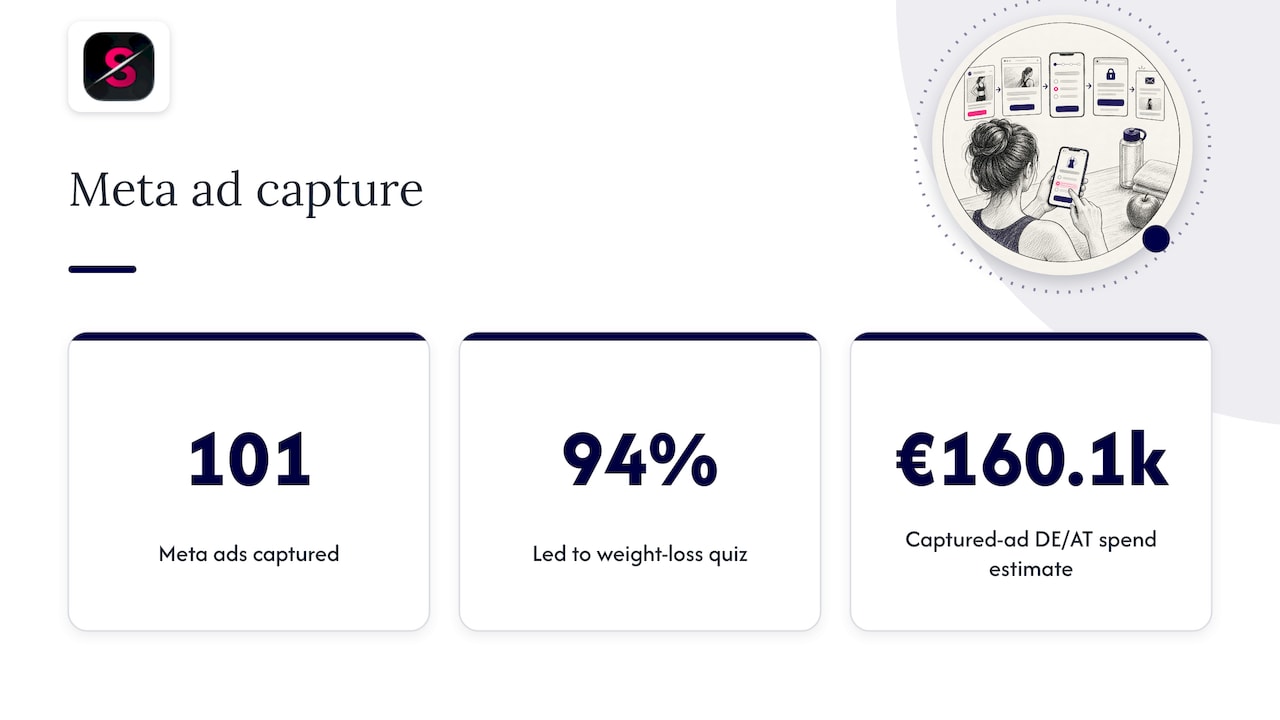
In our capture, taken on 23 October 2026, we found 101 Meta ads, and 94% of them led to the weight-loss quiz. We estimate about €160.1k of spend in Germany and Austria from those captured ads. That figure is an estimate based on captured ads, not reported spend. It does show a pattern worth copying: one dominant entry point, with the ad message handed straight to the first quiz screen.
For your own funnel, the lesson is continuity. The promise in the ad should be the first thing the quiz repeats. If you are reworking the page between ad and quiz, landing page optimisation basics are a useful checklist, and our conversion rate guide for subscription apps covers where those tests sit in the wider funnel.
The quiz: long on purpose
The quiz is long. Forbes Health describes a 10-minute online quiz covering height, weight, gender, age, motivation, activity level, eating frequency and risk factors such as diabetes, heart disease and depression, plus behavioural questions about life events and doubts. Choosing Therapy puts the questionnaire at 15 to 30 minutes. Across the funnel we captured 38 screens.
The app’s own documentation describes a “Big Picture” step where users state a long-term goal and motivation, and their responses are shared with coaches to personalise guidance.
Three patterns are worth noting:
-
Questions from three layers. Body and goal data first, then lifestyle, then psychology. Each layer makes the later plan feel more specific.
-
Answers that visibly matter. BarBend reports that the goal timeframe can move closer or farther depending on answers, and that suggested plan upgrades vary with the questionnaire.
-
Effort as commitment. A user who has spent 15 minutes describing their motivation is more likely to see the price as the next step, not as a barrier.
A behavioural-design critic, Jason Hreha, argues in The Behavioral Scientist that sensitive questions come before trust is built, and that showing a predicted goal date after two or three questions could convert better. That is a ready-made A/B test for any quiz funnel: move the first personal result earlier and measure completion.
The plan reveal and the paywall
After the quiz, the funnel shows a personalised plan with programme length and subscription cost, according to Choosing Therapy. The same critique documents a projected goal date, a pace disclaimer of one to two pounds a week, a behaviour profile with slider questions, a money-back guarantee and a paywall with a low-cost trial, a multi-month plan and a 15-minute urgency timer.
The sequence matters more than any single element:
| Stage | What the user sees | What it does |
|---|---|---|
| Quiz | Questions on body, habits, motivation | Builds effort and relevance |
| Result | Projected goal date and behaviour profile | Gives a personal result before payment |
| Reassurance | Guarantee and pace disclaimer | Handles doubt where it appears |
| Paywall | Trial offer, plan options, timer | Converts the commitment |
We saw the same logic in our BetterMe case study: a 48-screen relationship quiz, a personal result before the email request, visible plan building, proof placed where doubt appears, a preselected “Most Popular” plan and €0.49/day pricing. Across 16+ quiz funnels there, we estimate about €168.5k of lifetime EU and UK spend on captured ads. Again, that is an estimate from captured ads. Two different apps, one shared structure: result first, price second.
Pricing and trial terms differ by market and change often, so check the live paywall for your region rather than relying on a review. Our guide to pricing page conversions shows what to compare.
After the paywall: coaching and follow-up
Onboarding does not stop at payment. The Premium subscription FAQ states that eligible new US users get one-to-one coach messaging, and that the coach sends a welcome message and video on day one, a goal check-in on day three and weekly support afterwards. The quiz answers feed that conversation, so the first week of the product carries on from the first screen of the funnel.
For lifecycle and CRM teams, this is the part that is hardest to see from outside: the emails and prompts that follow the quiz. The useful questions are when the first message arrives, whether it references quiz answers, and how it returns the user to an unfinished flow.
What to test in your own funnel
Turn the teardown into a short test list:
-
Earlier personal result. Show a projected outcome after a few questions, then continue the quiz.
-
Quiz length by segment. Test a shorter path for cold Meta traffic against the full version.
-
Doubt-handling proof. Place a guarantee or testimonial on the screen where users hesitate, not in a footer.
-
Plan defaults. Test a preselected plan label and a per-day price framing.
-
Timer and trial framing. Test the urgency element against a calmer paywall.
More ideas are in our CRO test ideas for quiz and subscription funnels and quiz funnel examples, and our full quiz funnel breakdown goes screen by screen.
Seeing the full path without clicking through it
Most ad-spy tools stop at the ad. Researching a funnel like this by hand means an ad library, a burner inbox and hours of clicking through quizzes, and you still miss changes made next week.
Slicer Competitor Watch follows competitors’ Meta ads and the funnels they lead to: ad, landing page, quiz, paywall and follow-up emails. It saves dated captures of every screen and sends transactional emails and reports to your team when something changes, in one shared, searchable record. Teams use it to benchmark their funnel, find A/B test ideas and estimate competitor scale from EU ad spend and ad counts. Plans are Basic at $99 per month and Pro at $249 per month on the Competitor Watch page.

If you are choosing tools first, our overview of competitor intelligence tools for subscription funnel teams compares what each kind of tool captures.
FAQ
How long is the onboarding quiz?
Published reviews put it at about 10 minutes, and one review puts the questionnaire at 15 to 30 minutes. In our capture the funnel ran to 38 screens. Length varies by version and market.
Does the onboarding happen inside the app?
Mostly no. The quiz, plan reveal and paywall happen on the web, reached from ads, and the app experience, including lessons and coaching, follows. That is why web-to-app teams need to research the web funnel, not only the app store listing.
Are the ad spend figures exact?
No. Every spend figure we quote is an estimate based on captured ads, such as about €160.1k in Germany and Austria, and is not reported spend. We have no relationship with any brand we analyse.
How can I track changes to a competitor’s funnel?
Capture each step with a date and compare versions over time. Competitor Watch does this for ads, quizzes, paywalls and emails, and alerts your team when something changes.